Now live at menu.dech.in

Your menu,
one QR scan
away.

Create a beautiful digital menu, generate a QR code, and start receiving orders instantly. No app. No hardware. Just scan and order.

60s
Setup time
Menu items
Live
Order tracking
🔔
New Order!
Table 4 · ₹480
QR
SCAN TO ORDER
Trusted by restaurants, cafes & cloud kitchens
🍕 Pizzerias
Cafes
🍱 Cloud Kitchens
🍺 Bars & Pubs
🥘 Dhaba & Dine-in

Live in 3 simple steps

No technical knowledge needed. Set up your entire QR menu in under 60 seconds.

Build your menu

Add categories like Starters, Mains, Desserts. Upload photos, set prices, mark veg/non-veg. Beautiful and easy.

Get your QR code

One click generates a QR code and shareable link for your menu. Print it on table cards, banners, or receipts.

Receive & manage orders

Customers scan, browse, and order. Orders appear in your dashboard instantly. Update status from new → ready → done.

Everything your restaurant needs

A complete digital menu system built for Indian restaurants and cafes, with all the tools your team needs.

Menu Builder

Create unlimited categories and items with photos, descriptions, prices, and veg/non-veg indicators.

Instant QR Code

Get a unique QR code per menu. Print it or share the link. Customers scan — no app required on their end.

Order Manager

All orders in one place. Filter by status, menu, or customer. Move orders through new → confirmed → preparing → ready → done.

Team Roles

Invite staff, managers and admins. Each role gets the right level of access — from viewing orders to editing menus.

Customer Notes

Customers can add special instructions with their order. Allergies, spice levels, extra requests — all captured.

Multiple Menus

Create separate menus — Lunch, Dinner, Weekend Special, Bar Menu. Each gets its own QR code.

Order Manager

Everything in
one dashboard

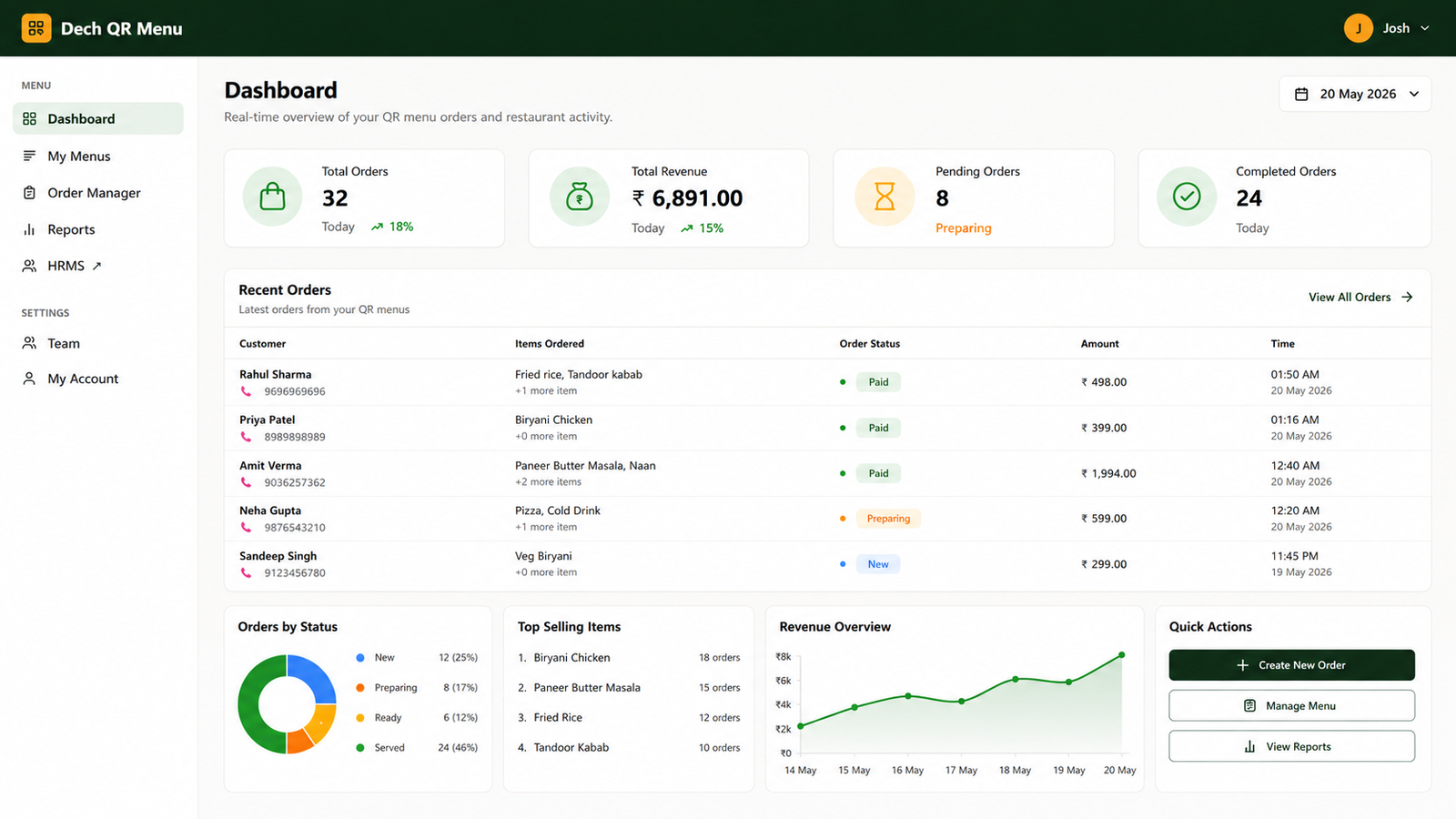
Real-time order feed

New orders appear instantly without refreshing. Your kitchen stays in the loop.

Status pipeline

Move each order from New → Confirmed → Preparing → Ready → Completed in one click.

Search & filter

Find any order by table number, customer name, phone, or status instantly.

Order details

See every item, quantity, price, special notes, and customer info in one view.

Start managing orders →

Bring your entire team

Assign roles so everyone has exactly the access they need — from the kitchen to the owner's desk.

ADMIN

Full Access

Create & delete menus, invite team members, view all orders, and manage every setting.

MANAGER

Menu & Orders

Edit menus, manage categories & items, update order status, and handle customer requests.

STAFF

Operations

View incoming orders, update order status (confirm, prepare, complete). Perfect for kitchen staff.

VIEWER

Read-Only

View menus and orders without making any changes. Great for monitoring or reporting purposes.

What our customers say

★★★★★

"We replaced printed menus completely. Customers love scanning the QR and the orders come directly to our dashboard. Setup took less than an hour."

R
Rajan Mehta
Owner, The Green Table, Mumbai
★★★★★

"Managing our team used to be a nightmare. Now I just invite my manager, assign the staff role to kitchen team, and everyone knows their job."

P
Priya Sharma
F&B Manager, Cloud Kitchen, Bangalore
★★★★★

"The order manager is brilliant. Every table's order is there, we can see special notes, and update status from the kitchen tablet. No more paper chits."

A
Arif Khan
Chef-Owner, Spice Route Cafe, Hyderabad

Ready to go digital?

Join hundreds of restaurants and cafes already using Dech QR Menu. Free to start — no credit card needed.

Create Your Menu Free → Already have an account?